


Is MediaHuman YouTube to MP3 no longer free?
No. MediaHuman YouTube to MP3 converter is still free to use. However, the TurboBoost mode requires payment.
MediaHuman YouTube to MP3 converter is a simple desktop tool for downloading YouTube audio, but its performance may depend on video availability, YouTube updates, and the version of the software you are using.
As frequent YouTube users, we have thoroughly tested whether this tool can successfully convert YouTube to MP3, how to fix download failures, and what effective MediaHuman YouTube to MP3 alternatives are available to help you successfully download YouTube content.
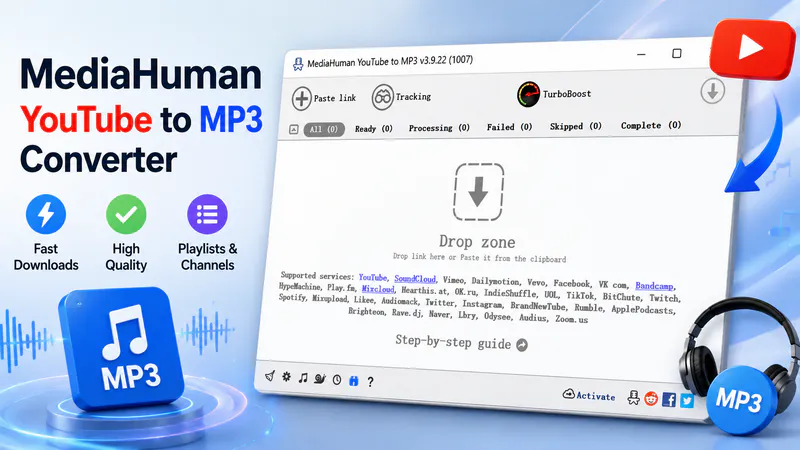
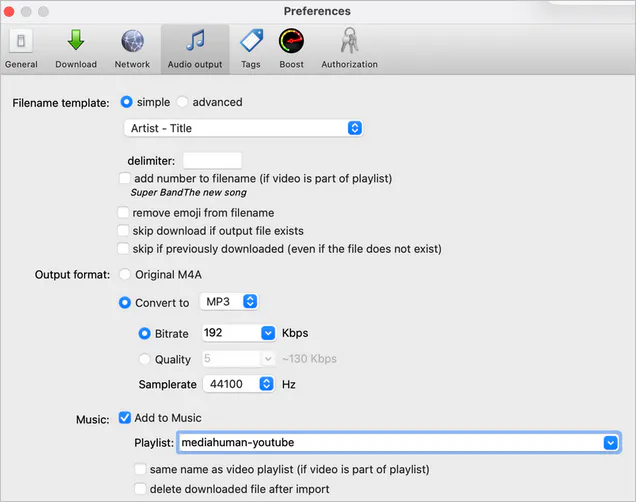
After installing MediaHuman YouTube to MP3 converter, simply select your preferred audio format (MP3, M4A, WAV, or OGG) in the "Preferences" menu, copy a YouTube video link, and paste it into the program; the download begins once the link is successfully parsed. In addition to YouTube, the software supports links from platforms such as SoundCloud, Mixcloud, and Apple Podcasts, making it ideal for batch-saving music, podcasts, courses, and interviews.
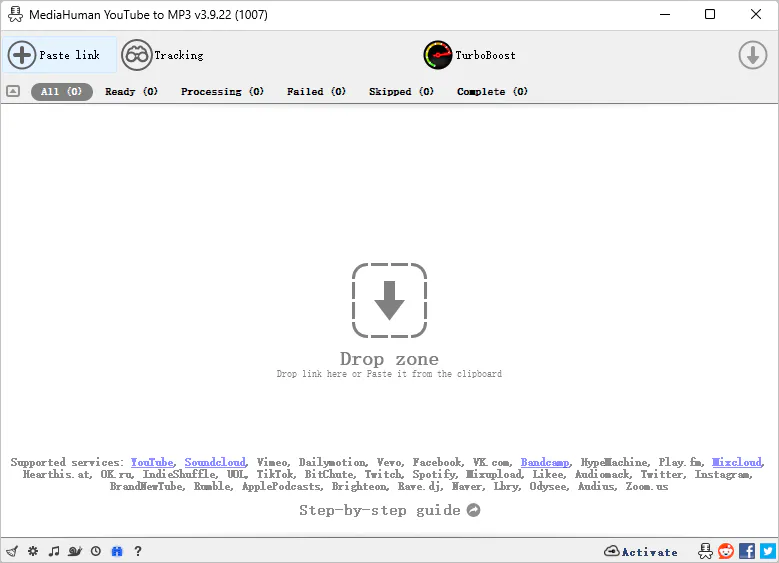
As of July 2026, the official version is 3.9.22; it supports Windows, macOS, and Ubuntu, and runs on Intel, AMD, and Apple Silicon devices. While "Boost" and "Normal" modes are available for free downloading, "TurboBoost" mode is a paid feature—though a free trial allowing you to download 20 videos is included.
| Features | MediaHuman YouTube to MP3 Converter |
| Supported Systems | Windows, macOS, Linux |
| Supported Websites | Vevo.com, Vimeo, Dailymotion, SoundCloud, Spotify, and more |
| Output Formats | MP3, M4A, WAV, and OGG |
| Batch Download Support | ✅ |
| Playlist/Channel Support | ✅ |
| Maximum Audio Bitrate | 320kbps |
| Is it Free? | Free version available |
| Ease of Use | Simple, suitable for average users |
| Main Limitations | Requires desktop software; may be affected by YouTube updates |
Overall, MediaHuman YouTube to MP3 converter is better suited for users who want to quickly extract audio, batch-download playlists, and organize local music files using desktop software. Its downsides are the lack of official Android or iOS versions and its parsing stability can still be affected by YouTube updates.
In addition to basic YouTube to MP3 conversion, MediaHuman offers desktop features such as playlist and channel tracking, tag editing, and batch task management.
| Test Items | Number of Items Displayed | Number of Items Recognized | Number of Items Downloaded |
| Standard Music Playlist | 51 | 51 | 51 |
| Playlist with deleted Videos | 82 | 74 | 74 |
| Playlist with 100+ Videos | 61 | 56 | 56 |
| Playlist with age-restricted Videos | / | / | Sign in to confirm your age |
| YouTube Music Playlist | 20 | 20 | 20 |
| YouTube Channel | 40 | 40 | 40 |
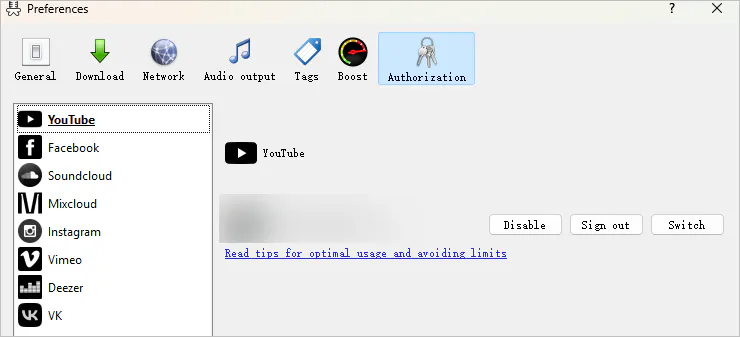
We tested the five different categories of playlists mentioned above. MediaHuman YouTube to MP3 can generally process the links we entered. However, deleted, removed, or hidden YouTube videos cannot be parsed successfully. For age-restricted videos, the program will ask to confirm your age and you can click "Preferences > Authorization > Authorize YouTube".
When parsing the playlist, the program will parse and download each video in order. The order of the downloaded files is consistent with the original playlist, which facilitates us to manage our own resource library.
The longest playlist (a total of 74 videos) took more than half an hour to complete the parsing. We all agreed that the parsing speed was not very fast, but at least we could successfully download YouTube to MP3.
2.1 Playlist/Channel Tracking
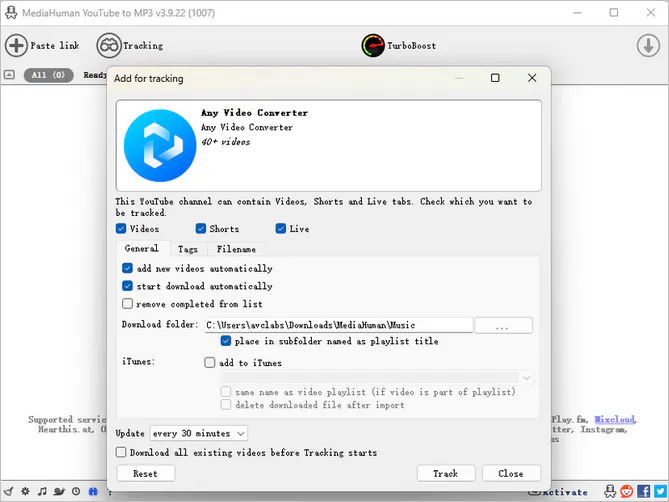
Add YouTube playlist/channel to track updates. For continuously updated podcasts, music channels, or course channels, you can have the software automatically track every hour, 12 hours, or a day to detect updated content and download new videos as they are posted, rather than reanalyzing the entire channel each time.
2.2 Tag and Cover Editing
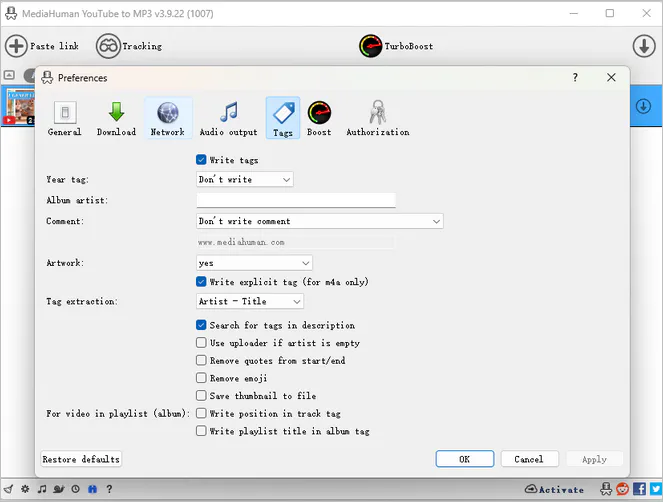
MediaHuman YouTube to MP3 identifies the song title and artist from the video information and writes this information to the audio file. Before downloading, you can manually modify tags such as title, artist, album, etc., or change the cover image.
2.3 Import to Music Library
If you are using macOS, you can enable the "Add music to Music" feature to share audio files between your iPhone and Mac, reducing the need for manual transfers.
Before installing MediaHuman YouTube to MP3 converter, we used VirusTotal to scan the installer file and the official website. This service analyzes files and URLs using multiple security engines from various cybersecurity companies.
The installer received a 0/47 detection result, meaning none of the 47 security vendors identified it as malware. The official MediaHuman website also received a 0/92 detection result, indicating that no participating security vendors found suspicious activity or malicious content associated with the website.
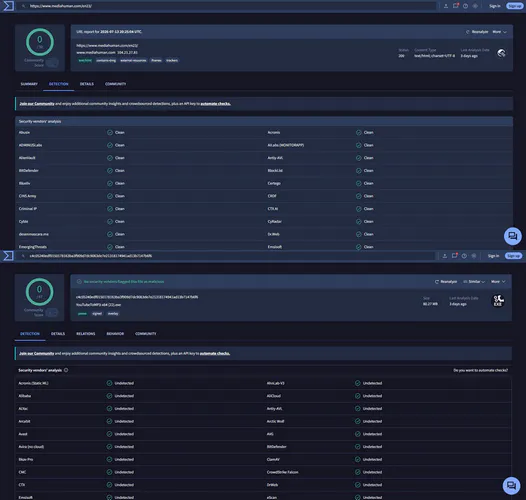
| Check | Status | What It Means |
| Official Website | ✅ Clean (0/92 detections) | No security vendors reported the website as malicious or suspicious |
| Installation File | ✅ Safe (0/47 detections) | No antivirus engines detected malware in the installation file |
| Download Source | Official MediaHuman website | Download from the official website avoids modified versions |
| Digital Signature | Present | The file publisher can be verified |
| Installation Behavior | The manual installation process went smoothly | No bundled software, browser changes, or unwanted offers |
| Privacy Risk | Low | Work as a desktop downloader |
Based on VirusTotal scan results and our installation tests, MediaHuman YouTube to MP3 converter downloaded from the official website is safe. Avoid using unofficial cracked versions or third-party download sites, as modified installers may contain unwanted software.
YouTube is extremely strict regarding download detection and frequently strengthens its anti-scraping mechanisms to block external downloads. Consequently, when MediaHuman YouTube to MP3 is not working, the issue is often not caused by the software itself, but rather with YouTube having tightened its download monitoring. You can try the following fixes first.
Fix 1: Update MediaHuman YouTube to MP3 Converter
Try updating to the latest build through Preferences > General > Reinstall. This often fixes connection-related issues because the MediaHuman team regularly updates its YouTube integration.

Fix 2: Check the VPN, Proxy, and Firewall
When we first tested the software, we used a VPN, which caused the program to time out while connecting to YouTube. This occurred because some VPNs only route traffic for specific websites and the app's connections don't follow it automatically.
In this case, simply turn off your VPN and try connecting again. If your VPN is enabled, you can use the built-in proxy support to connect the program with VPN traffic.
Fix 3: Clear Browser Cache and Cookies
YouTube data gets cached locally. Excessive YouTube download cache can also cause download failures.
Fix 4: Authorize YouTube Account
For "Sign in to confirm your not a bot" or "Sign in to confirm your age" errors, you simply need to authorize your YouTube account within the software: Preferences > Authorization > YouTube and authorize.
The solutions provided above may not solve every problem, as download issues are complex. If you are in a hurry to convert YouTube to MP3, you might want to consider these MediaHuman YouTube to MP3 alternatives instead.
| YouTube to MP3 Converter | Website | Key Features | Best For |
| Any Video Converter |
Download Win Download Mac |
Audio conversion and one-stop editing | All-in-one audio process solution |
| JDownloader 2 | https://jdownloader.org/ | Automatically scan and download in batches | Advanced users |
| 4K Video Downloader+ | https://www.4kdownload.com/ | MP3, M4A and OGG conversion | Popular audio format conversion |
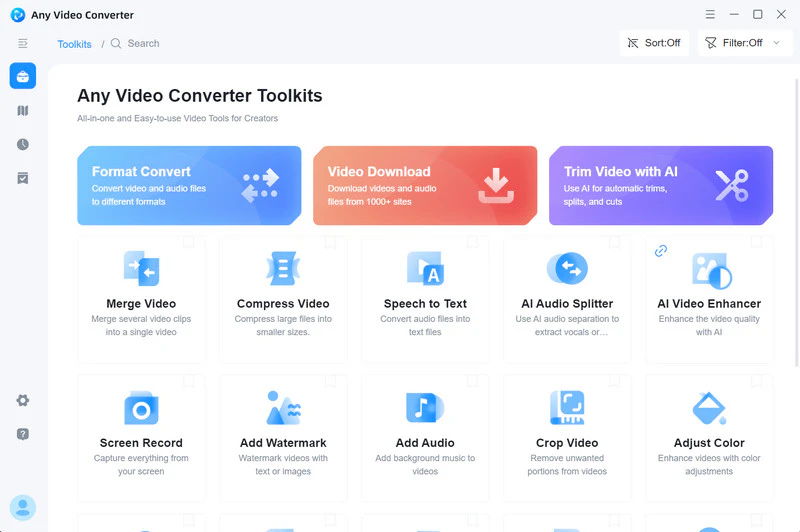
Any Video Converter is better for YouTube downloading, format conversion, and media editing.
While MediaHuman YouTube to MP3 converter is limited to extracting audio, Any Video Converter allows you to download full videos, channels, and playlists to MP3, WAV, FLAC, MP4, MKV, and more. You can select specific video tracks, audio tracks, subtitles, and audio/video quality before downloading. Its built-in browser and keyword search feature eliminate the need to copy and paste links, which means you can browse YouTube content, play videos, and download YouTube directly within the program. Then proceed to trim, merge, or split the audio.
|
|
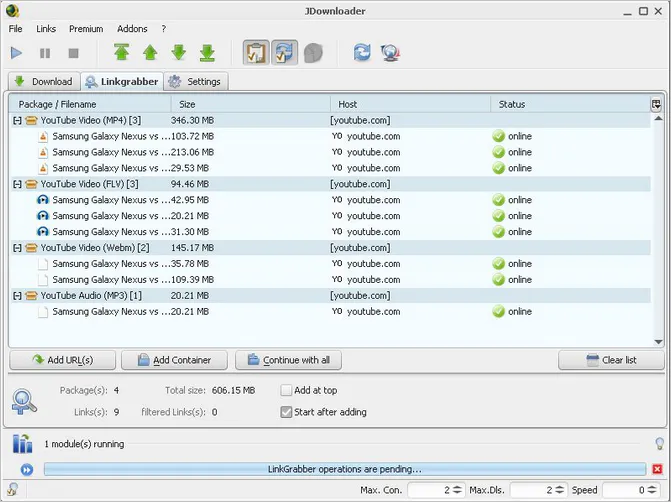
JDownloader 2 primarily grabs links using its built-in YouTube plugin; its download settings are more complex than MediaHuman YouTube to MP3 converter, and audio extraction is just one of its downloading features. However, a key advantage is its ability to batch-process hundreds of YouTube links at once and convert them to MP3. Once you have mastered the process, downloading from YouTube becomes very convenient.
|
|
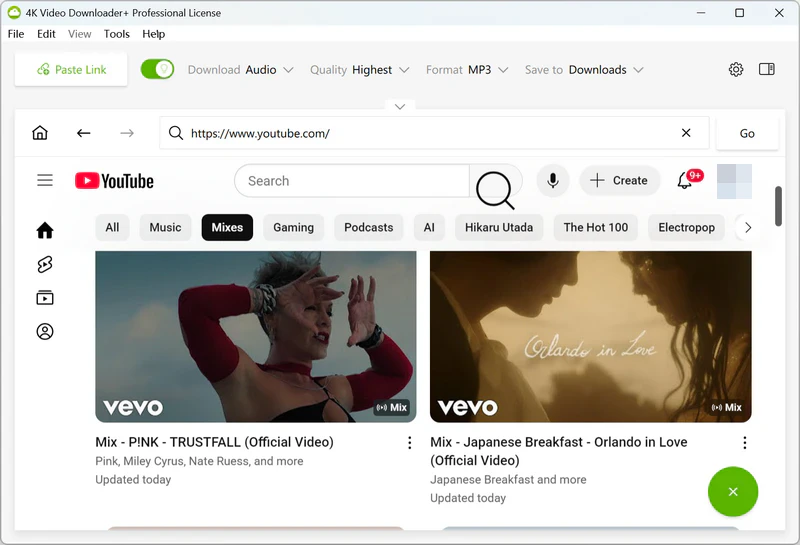
4K Video Downloader+ supports audio extraction in MP3, M4A, and OGG formats, as well as the downloading of videos up to 8K resolution, subtitles, and entire playlists or channels. Its "Smart Mode" allows you to pre-configure settings, such as format, quality, subtitles, and the save directory. It will automatically apply them to future tasks. Like the MediaHuman YouTube to MP3 converter, it also features an automatic download function for new videos from subscribed channels, called "Subscriptions".
|
|
 Discover More YouTube to MP3 Converters >>
No. MediaHuman YouTube to MP3 converter is still free to use. However, the TurboBoost mode requires payment.
You can select the MP3 quality in the audio output settings, with a maximum of 320kbps.
However, 320kbps refers to the encoding bitrate of the output file, not necessarily the quality of the original YouTube audio track. If the source audio was already compressed at a lower bitrate, re-encoding it to 320kbps will not restore lost audio details; it will simply result in a larger file.
In MediaHuman YouTube to MP3 converter V3.9.22, we only saw MP3, M4A, OGG, and WAV formats in output options. However, downloaded M4A audio files are typically encoded with AAC.
MediaHuman does not officially set a daily download limit. However, if you download a large number of videos in a short period of time, you may encounter situations where videos cannot be parsed or downloads fail.
It depends on your needs:
| YouTube to MP3 Converter | Best For |
| Any Video Converter | It's easy to use, offering a one-stop solution for downloading and format conversion. |
| JDownloader 2 | It has strong batch download capabilities and is suitable for downloading large amounts of content. |
| 4K Video Downloader | If you only need to download a small number of videos per day. |
The following are possible reasons, but not limited to these:
1. YouTube has strengthened its web crawling mechanisms.
2. You downloaded private/age-restricted/membership-only/region-restricted videos.
3. VPNs or proxies may affect connectivity, causing network instability.
4. Software caching.
No. MediaHuman currently does not have an official Android app. Be careful of encountering virus installation packages.
Yes. MediaHuman YouTube to MP3 converter doesn't have overly complicated settings; simply copy and paste the YouTube link to download videos as MP3. Just be careful that downloaded content complies with local laws and YouTube's terms of use, and avoid downloading copyrighted music for commercial purposes.
MediaHuman YouTube to MP3 Converter is worth trying if you mainly need a simple desktop YouTube audio converter. If you also need video conversion and editing, Any Video Converter may be a more complete option. For large download queues, JDownloader 2 offers more control, while 4K Video Downloader+ is easier for users who want both video and audio downloads.
If you encounter issues with MediaHuman, or require more video downloading, format conversion, and editing features, consider alternatives such as Any Video Converter, JDownloader 2, or 4K Video Downloader+. Ultimately, the best YouTube to MP3 converter depends on your specific needs; it's always recommended to download software from official channels and use download tools appropriately.

Besty Smith is a talented and insightful content creator with a keen interest and passion for software programs. She focuses on in-depth research and hands-on experience with various types of software, providing readers with in-depth and inspiring content through precise writing. With her keen insight into the software industry, Besty is committed to helping readers keep abreast of the latest industry trends so that they can stay competitive in the digital age.